Tally export & books lock
Hand your CA a clean month — and lock it once it’s filed. Export a month’s sales, receipts, purchases and payments as TallyPrime vouchers, with a statements workbook your accountant can read. When the period is closed, lock the books so nobody can change it by mistake.
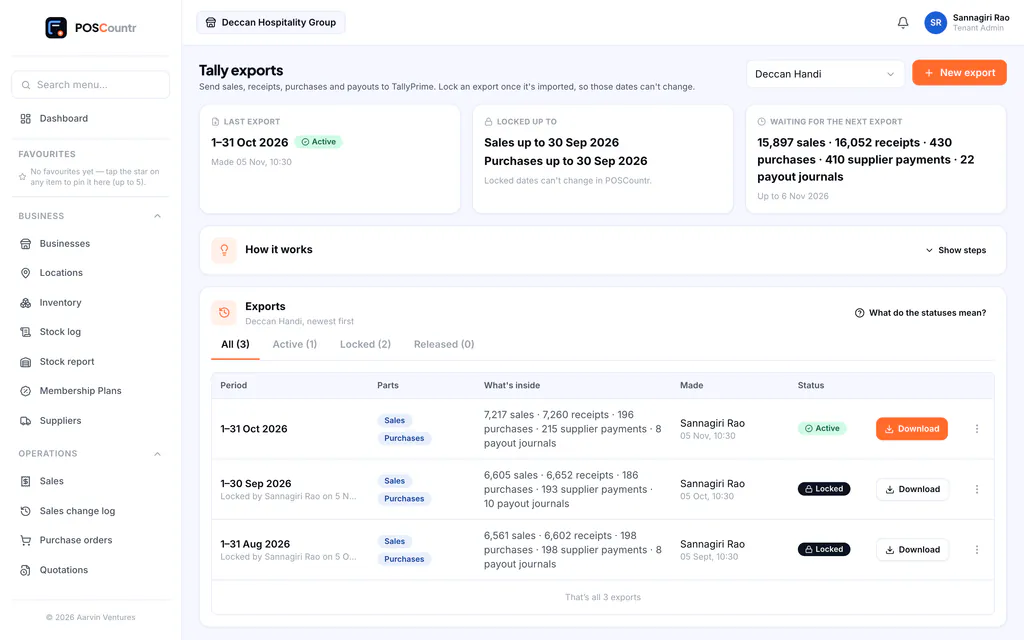
What Tally export & books lock does
TallyPrime XML
Sales, receipts, purchases, payments and journals as Tally vouchers, with party ledgers matched by GSTIN.
Statements workbook
One Excel file with the summary, sales register, GST by rate, HSN summary, e-commerce (9(5)) supplies, receipts, purchases and payouts.
Ledger mapping
Map POSCountr’s accounts to your own ledger names once; every export follows it.
Books lock
Lock a filed period and every sale, payment and purchase in it is frozen. Only POSCountr support can unlock it, with a reason, and the owner is told.
Changes after export
If something changes after an export, the export says so, so you can re-export or mark it fixed.
Reconciles to your GST summary
Export totals tie back to the GST report for the same period.
Tally export & books lock, in the product
Real screens from POSCountr, shown with demo data.
Questions about Tally export & books lock
Which version of Tally does it support?
The export is TallyPrime XML. Your accountant imports it like any other voucher file.
Tally export & books lock at a glance
- Plans
- Business, Pro and Enterprise · add-on for Starter
- Works on
- Web dashboard · iPhone, iPad & Android app
- Good for
- Retail & kirana · Wholesale & distribution · Chains & multi-brand groups
See POSCountr on your own business.
A 30-minute walkthrough on WhatsApp video or at your counter in Hyderabad. We set you up, import your products and train your team.
Already a customer? Get the app.