Kitchen display & KOT
The kitchen knows what’s next — without a shout across the pass. Sales go to the kitchen as tickets the moment they are placed. Cooks see what to make and how long it has waited; servers see what is ready. Tables, rounds and printed KOTs stay in step.
What Kitchen display & KOT does
Live kitchen board
Tickets move from preparing to ready to served, with the time each has waited, on a phone or a tablet in the kitchen.
KOT rounds
Add a second round — dessert, more bread — and only the new items go to the kitchen as a fresh ticket.
Kitchen staff see only the cooking
Kitchen logins see items, table and time. No prices, no customer details, no billing.
Tables & floor plan
Lay out your floor, see which tables are occupied and open a table’s sale with one tap.
Printed KOTs
Print a kitchen ticket on a thermal printer when your kitchen prefers paper.
QR table ordering
Guests can order from a QR code on the table, with staff approving each order before it reaches the kitchen. Switched on per business on request.
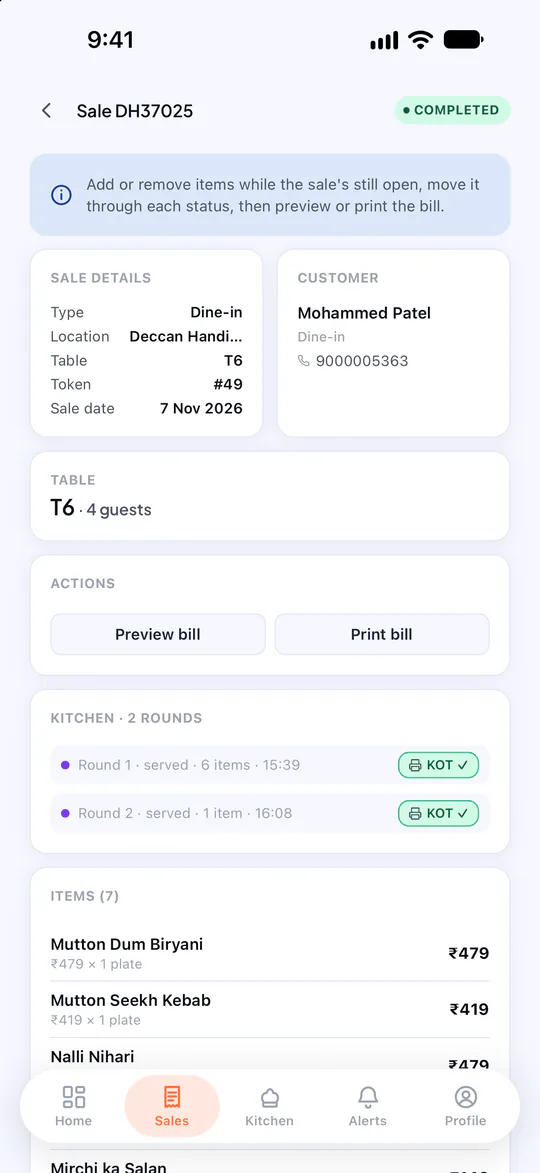
Kitchen display & KOT, in the product
Real screens from POSCountr, shown with demo data.
Questions about kitchen display & KOT
Do kitchen staff need a computer?
No. Kitchen staff sign in on the POSCountr app on any phone or tablet with a 6-digit PIN. A tablet shows a three-column board.
Can I use POSCountr without the kitchen flow?
Yes. Counter businesses — a café counter, a shop — bill straight to paid with no kitchen step. The kitchen flow is set per business.
Kitchen display & KOT at a glance
- Plans
- Business, Pro and Enterprise
- Works on
- Web dashboard · iPhone, iPad & Android app
- Good for
- Restaurants & cafés · Chains & multi-brand groups
See POSCountr on your own business.
A 30-minute walkthrough on WhatsApp video or at your counter in Hyderabad. We set you up, import your products and train your team.
Already a customer? Get the app.