Every business.
One flow.
Billing, GST, kitchen, stock and staff — one system for every counter you run. Built in Hyderabad for restaurants, retail, pharmacies and owners who run more than one business — on the web, iPhone, iPad and Android.
- GST-ready bills
- Many GSTINs, one login
- Web billing works offline
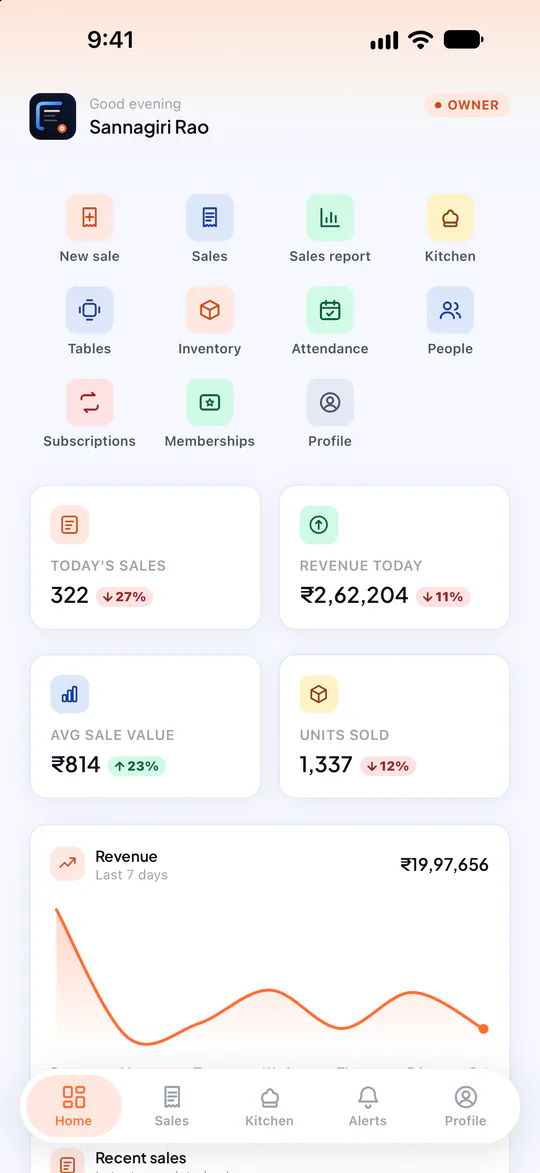
Everything your business runs on, in one place.
Billing at the counter, tickets in the kitchen, stock in the store room, payroll on the register and the month’s books for your CA — POSCountr keeps them in one flow, for one business or ten.
Billing that keeps up with a rush
Dine-in, takeaway or delivery. Split a bill across cash, UPI and card, sell loose goods by rupee amount, fix a wrong bill in one step — and print or share it on WhatsApp the moment it’s paid.
Split paymentsSell by amountCancel & copyBluetooth printingGST, done right
CGST/SGST or IGST from the GSTIN, HSN/SAC on every line, gap-free series per financial year.
A calm kitchen
KOT rounds on a live board, tables on a floor plan, no prices on kitchen screens.
Stock with a memory
A ledger of every movement, batches and expiry sold first-expiry-first-out.
Books your CA will like
TallyPrime vouchers, a statements workbook, and a lock once the month is filed.
A café, a restaurant chain and a shop — one login
Each business keeps its own GSTIN, invoice series, products and team. You see all of them, and compare every outlet side by side.
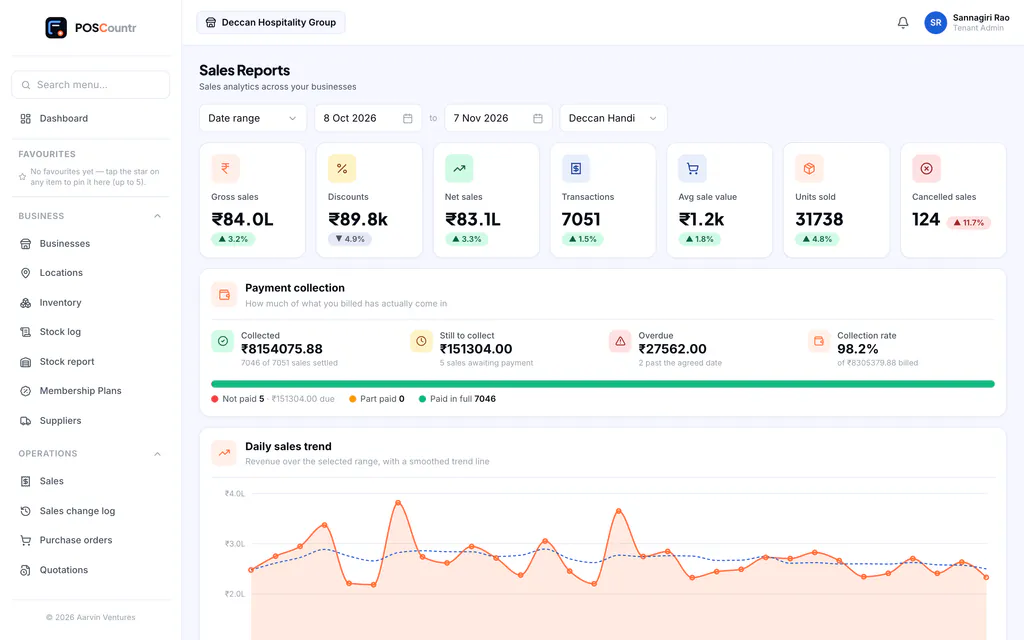
Many GSTINsMany outletsOutlet comparisonYour whole business, on any screen.
Owners and managers run the back office from any browser at their own address — and keep billing even when the internet drops.
The counter in your pocket.
Bill, take payments, run the kitchen board and check today’s numbers from an iPhone, iPad or Android phone. Print to a Bluetooth receipt printer or share the bill on WhatsApp.
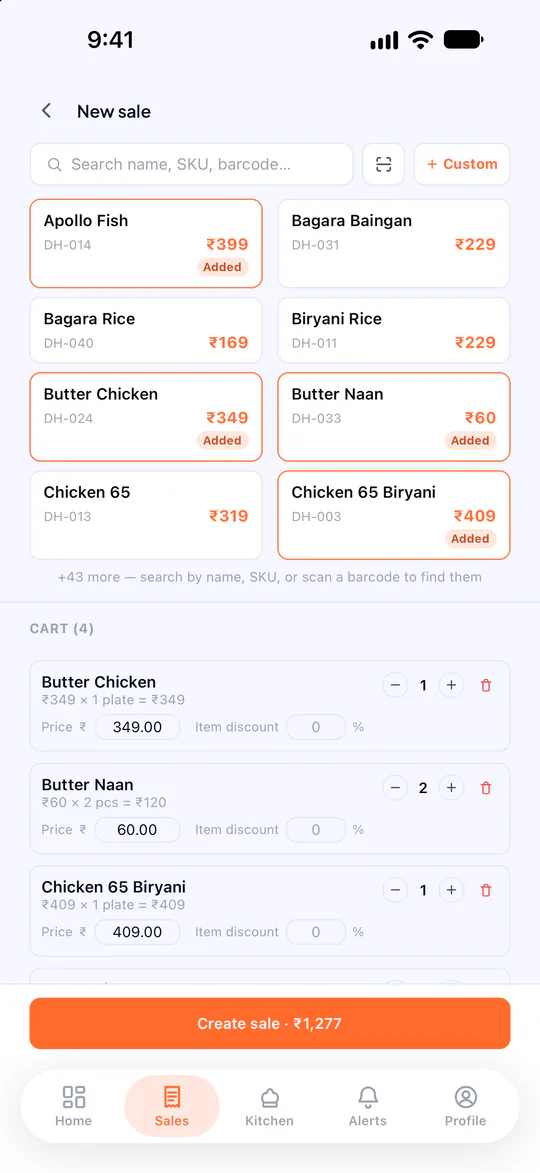
New sale
Products side by side, cart and total always in view.
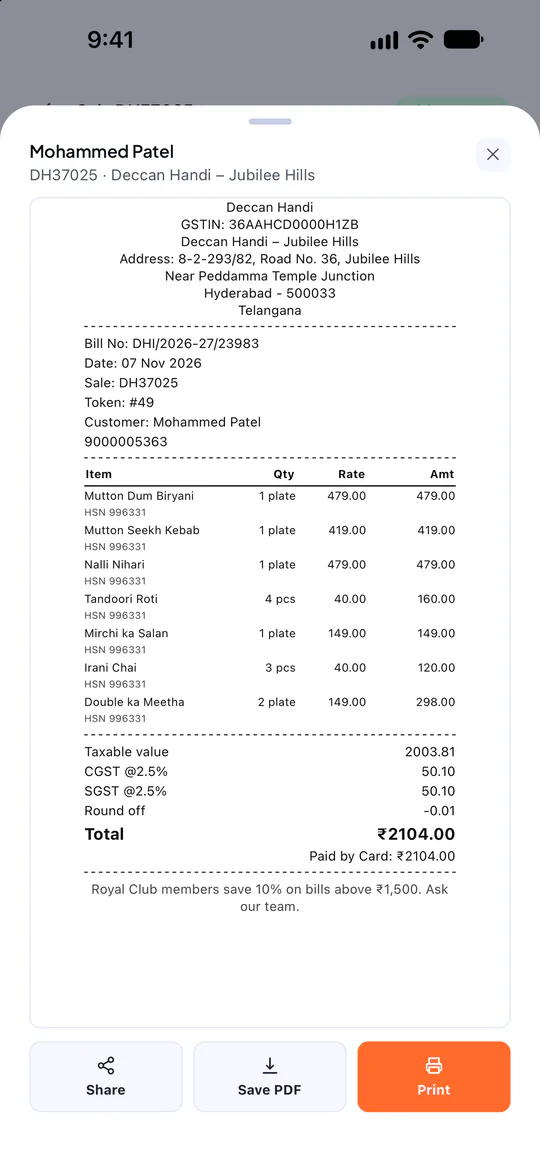
GST bill
CGST/SGST split, HSN codes and how it was paid.
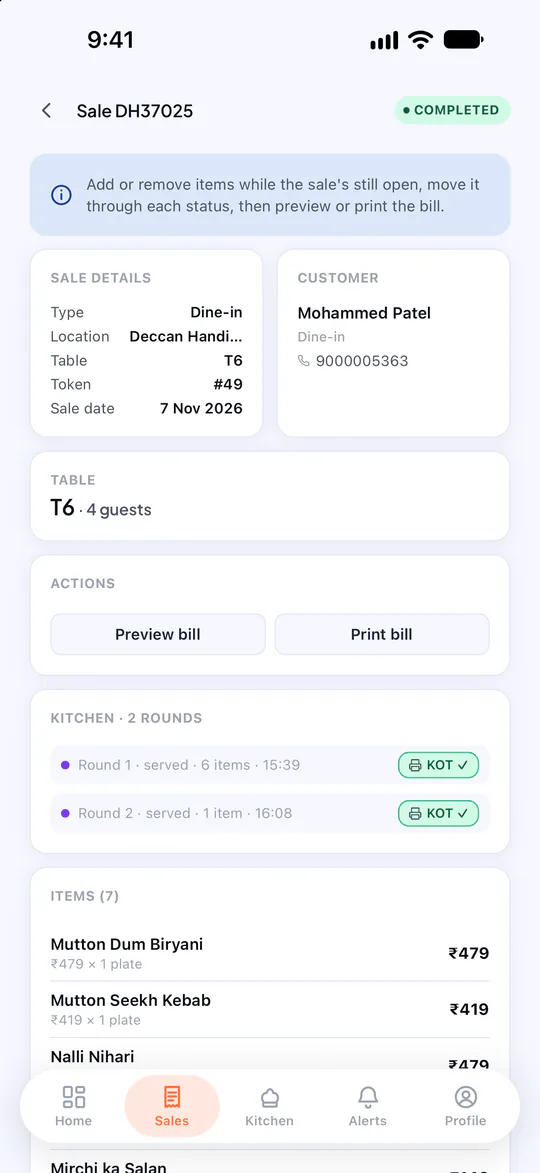
Tables & kitchen
KOT rounds for every table, tracked to the bill.
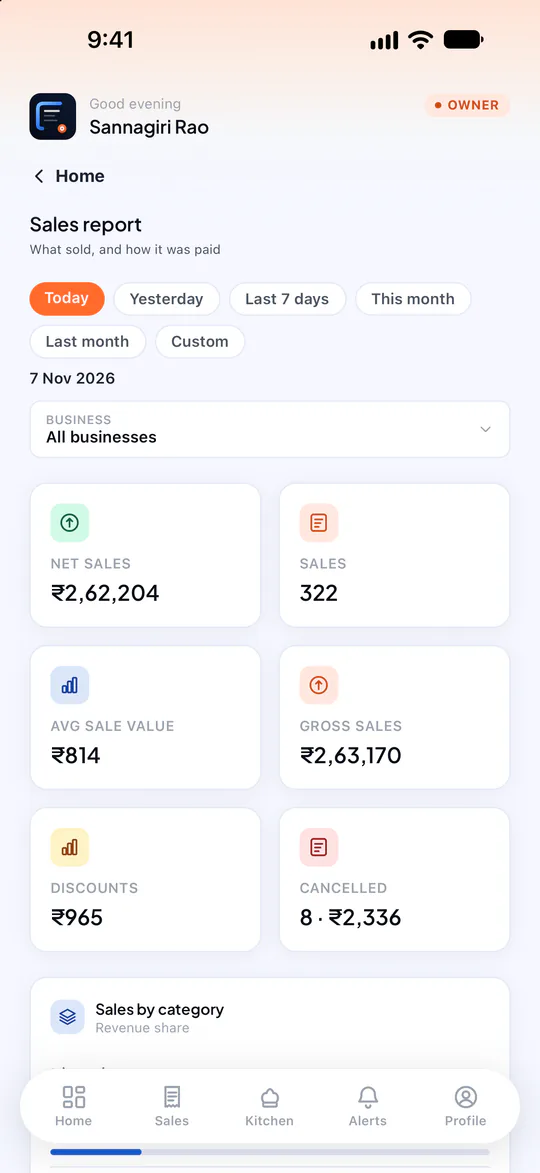
Sales report
Payments, categories and channels for any dates.
Eleven parts of your business. One system.
Billing & POS
Ring up a sale in seconds — at the counter, at the table or on the phone.
ExploreGST invoicing
Correct GST on every bill, the right series for every business.
ExploreKitchen display & KOT
The kitchen knows what’s next — without a shout across the pass.
ExploreInventory & stock ledger
Stock that counts itself down — and remembers why it moved.
ExplorePurchasing & suppliers
Order, receive and pay suppliers — with stock updated as goods arrive.
ExploreMemberships & subscriptions
Turn regulars into members, and regular orders into automatic bills.
ExploreReports & dashboards
Know how today is going — and how every outlet compares.
ExploreTally export & books lock
Hand your CA a clean month — and lock it once it’s filed.
ExploreSwiggy & Zomato sales
Platform orders in the same books — with the GST rules they need.
ExploreStaff, roles & attendance
Everyone signs in as themselves — and sees only what their job needs.
ExploreMulti-business & multi-outlet
A café, a restaurant chain and a shop — under one login.
ExploreSee it on your business
A 30-minute walkthrough with your own products, on WhatsApp video or at your counter.
Book a free demoSet up for the way you sell.
Kitchen flow, stock, batches, purchasing, quotations and subscriptions are switched on per business — so a café, a pharmacy and a distributor each get the POSCountr they need.
Restaurants & cafés
From the first chai to the last table — billing, kitchen and tables in step.
RestaurantsCafésBakeriesBarsRetail & kirana
Scan, bill, and know exactly what is left on the shelf.
Kirana storesSupermarketsApparelElectronicsPharmacy & healthcare
Batches, expiry and schedules handled — first expiry out, every time.
Medical storesPharmaciesClinics with a dispensaryOpticalsSalons, gyms & services
Packages, memberships and monthly bills that raise themselves.
Salons & spasGyms & studiosRepair shopsConsultantsWholesale & distribution
Quote, bill on credit and keep stock straight across godowns.
DistributorsWholesalersStockistsTrading companiesChains & multi-brand groups
Every brand, every outlet, one owner login.
Restaurant chainsFranchise outletsMulti-brand groupsOwners with more than one businessBills the taxman expects. Books your CA can import.
- CGST + SGST within your state, IGST across states — from the GSTIN
- HSN or SAC saved on every line when the invoice is issued
- Gap-free invoice series per business, per financial year
- GST summary with an HSN table in GSTR-1 layout
- Section 9(5) handling for Swiggy and Zomato orders
- TallyPrime export and a books lock once a period is filed
Your data stays yours — and stays apart.
POSCountr runs many businesses on one platform, so separation is built into the database itself, not just the screens.
Database-level separation
Every business’s rows are fenced off by PostgreSQL row-level security, under four more checks in the application — five layers in all. A query without a business scope sees nothing.
Your own sign-in address
Your team signs in at your-business.poscountr.com, and that address only accepts your people.
PINs for the floor, passwords for owners
Six-digit staff PINs refuse easy patterns and must be changed at first sign-in. Repeated wrong attempts lock that device out, for longer each time.
Sessions you can end instantly
Short-lived sign-in tokens, refresh tokens stored only as hashes and rotated on every use. Signing someone out, blocking them or changing a password ends their sessions at once.
An audit trail
Cancellations, payment-mode changes, Tally exports, book locks and support access are recorded with who, when and why.
Least privilege
Managers see one outlet. Kitchen staff see the kitchen board. Support access to a business is read-only and needs a recorded reason.
One account. Every device your team already has.
Web dashboard
Owners and managers
The full back office in any browser at your-business.poscountr.com — billing (even offline), products, purchasing, reports, Tally export, layouts and settings.
iPhone & iPad
Owners, managers and kitchen staff
Bill, take payments, run the kitchen board, check reports and mark attendance. iPad gets a two-pane sale screen and a three-column kitchen board.
Android
Owners, managers and kitchen staff
The same app on Android phones and tablets, with direct Bluetooth printing to thermal receipt printers.
- 14
- modules, switched on per business
- 3
- apps: web, iPhone & iPad, Android
- 7
- kinds of business, from cafés to pharmacies
- 5
- layers keeping each business’s data apart
From first call to first bill in days.
- 01
Talk to us
Tell us what you run — one café or ten outlets. We show you POSCountr on your kind of business and recommend a plan.
- 02
We set you up
Your businesses, GSTINs, outlets, products, tax rates and bill layouts — imported from Excel where you have them.
- 03
Your team signs in
Managers and kitchen staff get usernames and one-time PINs. Install the app or open your web address and start billing.
- 04
Go live, with us on call
We stay close through your first weeks — on WhatsApp, on the phone, or at your counter in Hyderabad.
Questions owners ask us
What is POSCountr?
POSCountr is billing and business software for Indian businesses: point of sale, GST invoices, kitchen display, inventory, purchasing, memberships, reports and Tally export, on the web and on iPhone, iPad and Android. One owner login can run several businesses, each with its own GSTIN.
Who is POSCountr for?
Restaurants, cafés, bakeries and cloud kitchens; kirana and retail stores; pharmacies; salons, gyms and service businesses; wholesalers; and owners who run more than one business or outlet.
How much does POSCountr cost?
Pricing depends on how many businesses, outlets and modules you need, so we share a quote after a short call. There are four plans — Starter, Business, Pro and Enterprise — with add-ons for specific needs.
Does POSCountr calculate GST correctly?
POSCountr applies CGST and SGST within your state and IGST across states, based on your business’s registration and your customer’s GSTIN or state, with HSN or SAC on every line. You remain responsible for setting the right rates and codes on your products.
Does it work offline?
The web dashboard keeps billing when the internet drops and syncs when it is back. The mobile app needs a connection.
Where do I download the app?
Search “POSCountr” on the App Store (iPhone and iPad) or Google Play (Android), or use the links on our Download page. The app is free to download; it needs a POSCountr account.
POSCountr at a glance
- What it is
- Point of sale, GST invoicing, kitchen display, inventory, purchasing, memberships, reports and Tally export
- Who it’s for
- Restaurants & cafés · Retail & kirana · Pharmacy & healthcare · Salons, gyms & services · Wholesale & distribution · Chains & multi-brand groups
- Runs on
- Web dashboard · iPhone & iPad (iOS 16.4+) · Android
- Multi-business
- Several GSTINs and outlets under one owner login
- GST
- CGST/SGST or IGST automatic · HSN/SAC per line · gap-free series per financial year
- Pricing
- Plans by quote — Starter, Business, Pro, Enterprise · 14-day trial
- Made by
- Aarvin Ventures, Hyderabad · GSTIN 36BXTPR0969J1ZJ
See POSCountr on your own business.
A 30-minute walkthrough on WhatsApp video or at your counter in Hyderabad. We set you up, import your products and train your team.
Already a customer? Get the app.