Purchasing & suppliers
Order, receive and pay suppliers — with stock updated as goods arrive. Raise purchase orders, receive goods into the right outlet, and keep track of what you owe each supplier, whether you paid cash, by bank, by UPI or on credit.
What Purchasing & suppliers does
Purchase orders
Numbered purchase orders with GST worked out — IGST when the supplier is in another state.
Receive into stock
Receiving a purchase adds the stock at the outlet that received it, at the price you paid.
Supplier payments
Record payments by cash, bank, UPI, cheque or card; see what is paid, part-paid and on credit.
Way bills on file
Attach the way bill to the purchase it belongs to.
Purchase reports
What you bought, from whom and at what cost, for any period.
Straight to Tally
Purchases and supplier payments are part of the Tally export, so your books match.
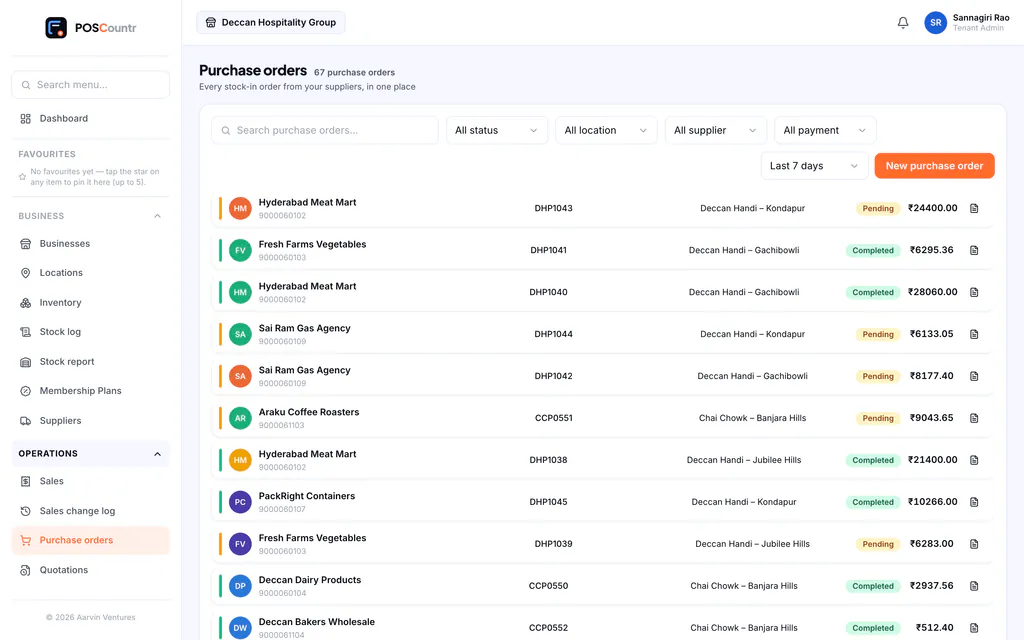
Purchasing & suppliers, in the product
Real screens from POSCountr, shown with demo data.
Questions about purchasing & suppliers
Is purchasing available in the mobile app?
Purchasing is on the web dashboard. Stock received through it shows up everywhere, including the app.
Purchasing & suppliers at a glance
- Plans
- Business, Pro and Enterprise · add-on for Starter
- Works on
- Web dashboard
- Good for
- Retail & kirana · Pharmacy & healthcare · Wholesale & distribution
See POSCountr on your own business.
A 30-minute walkthrough on WhatsApp video or at your counter in Hyderabad. We set you up, import your products and train your team.
Already a customer? Get the app.